
Xen Green CM11 Theme2.2 - Get APK
You'll be able to download in few seconds.
Publisher Description
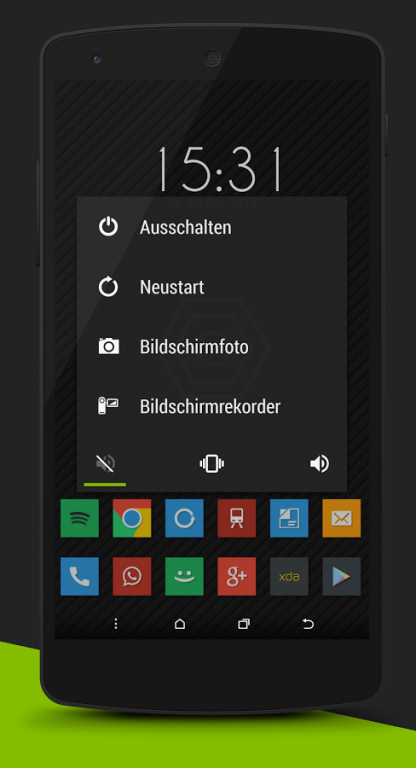
To use this theme you need a CUSTOM ROM that supports the NEW THEME ENGINE.
IF YOU DON`T KNOW WHAT THAT IS DON`T BUY IT.
Check out the g+ community:
https://plus.google.com/u/0/communities/109212659618965180851
INSTALLATION
1. Install the app
2. Go to Settings -> Themes
3. Select Xen
4. Apply it
5. Reboot your device
The theme is made for XXHDPI devices but should work on lower resolutions too.
THEMED SYSTEM:
* Notifications
* Quick settings (all icons)
* Slim Recents
* Dialog Windows
* Toast
* Sliders
* Spinners
* Buttons/Toggles
* Holo White & Dark Styles
THEMED APPS:
* Apollo
* Calculator
* Calendar
* Contacts
* Chrome
* Hangouts
* Dialer/Phone/Incall
* Deskclock + Analog Widget
* MMS + Widget
* Settings
* AOSP Keyboard
* Google Keyboard
* Swype Keyboard
* Google + (light)
* Google Mail
* Whatsapp (light)
* Custom lockscreen wallpaper & wallpaper
* Custom Bootanimation
* Custom Ringtone
* New Font (Android L)
* Animated Icons
* Touch animations
If you find any bugs/ unthemed elements, write me an email and tell me which ROM are you using. (Sent me Screenshots if possible) Don´t give a bad review cause of this.
If you get errors after updating:
1. Uninstall the theme completely
2. go to the folder /data/data/ and delete the entire directory "com.blazze11.xen"
3. Reboot your device
4. Reinstall the theme.
5. Reboot your device again
About Xen Green CM11 Theme
The company that develops Xen Green CM11 Theme is blazze11. The latest version released by its developer is 2.2.
To install Xen Green CM11 Theme on your Android device, just click the green Continue To App button above to start the installation process. The app is listed on our website since 2014-11-04 and was downloaded 0 times. We have already checked if the download link is safe, however for your own protection we recommend that you scan the downloaded app with your antivirus. Your antivirus may detect the Xen Green CM11 Theme as malware as malware if the download link to com.blazze11.xen is broken.
How to install Xen Green CM11 Theme on your Android device:
- Click on the Continue To App button on our website. This will redirect you to Google Play.
- Once the Xen Green CM11 Theme is shown in the Google Play listing of your Android device, you can start its download and installation. Tap on the Install button located below the search bar and to the right of the app icon.
- A pop-up window with the permissions required by Xen Green CM11 Theme will be shown. Click on Accept to continue the process.
- Xen Green CM11 Theme will be downloaded onto your device, displaying a progress. Once the download completes, the installation will start and you'll get a notification after the installation is finished.
Program Details
System requirements
Download information
Pricing
Version History
version 2.2
posted on 2014-11-04
The actionbar of the settings does look weird on some devices - I´m working on it already, If you have this problem please email me I need someone testers,- new switches,- new scrubbers & line,- themed navigationbar,- actionbar fixes,- removed gmail theme to fix fcs,- new trebuchet appdrawer icon,- slim recents fixes,- settings width changes,- aosp keyboard fixes
version 2.2
posted on 2014-11-04
Disclaimer
External Download
We do not host Xen Green CM11 Theme on our servers. We did not scan it for viruses, adware, spyware or other type of malware. This app is hosted by Galad and passed their terms and conditions to be listed there. We recommend caution when installing it.
The APK Download link for Xen Green CM11 Theme is provided to you by apps112.com without any warranties, representations or guarantees of any kind, so access it at your own risk.
If you have questions regarding this particular app contact the publisher directly. For questions about the functionalities of apps112.com contact us.
